
Open the pin, tap Share, then tap Copy link. That puts the pin's link on your clipboard so you can paste it into a message, a note or an app like pinni, which finds the clothes in the pin. In Safari the steps are Share, then Copy.
It takes two taps, and almost everything you want to do with a pin starts there: send it to a friend, save it to a note, or shop the outfit in it. If you cannot find the button, here is where it lives.
In the Pinterest app
- Open the pin you want.
- Tap the Share icon, the arrow under the pin.
- Tap Copy link.
Pinterest changes its layout from time to time, so a button may sit in a slightly different place. Look for Share first. If you cannot see it, scroll up so the pin's photo and buttons are on screen.
In Safari
- Open the pin in Safari.
- Tap the Share button in the toolbar.
- Tap Copy.
What the link looks like
You will usually get a short link that starts with pin.it, or a longer one that starts with pinterest.com/pin. Both point to the same pin and both work when you paste them.
Paste it into pinni to shop the outfit
If the pin is an outfit, the link is all you need to find the clothes. In pinni, tap the plus button, stay on the Link tab and tap Paste. pinni then spots each piece in the photo and lists a price with a link to the seller for each one.
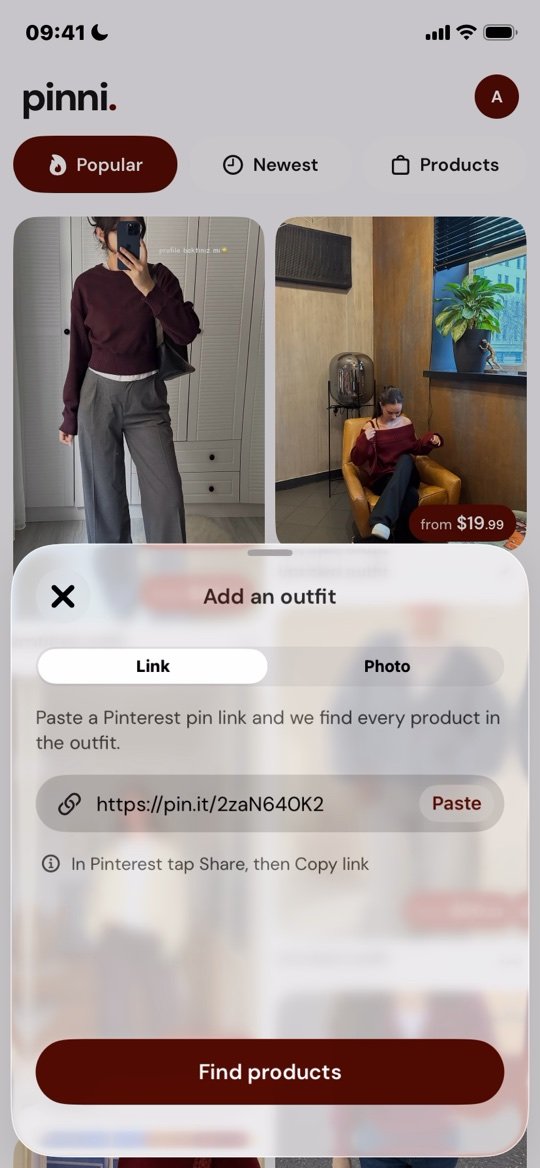
No link? You do not need one. Switch to the Photo tab and pick a screenshot or any photo from your library instead. That covers pins that have been deleted, and outfits from Instagram or TikTok.
Matches are close, not always exact, so check the seller's page before you buy. pinni is an independent iPhone app, not connected to Pinterest. Get the app.
Other things to do with a pin link
- Send it in a message so a friend sees the exact pin.
- Paste it into Notes with a line about which piece you liked.
- Keep it with your budget in a shopping list.
If the pin has no shop link behind it, how to find clothes from a Pinterest photo covers the other ways in, and can you buy clothes from Pinterest? explains what happens at checkout. For a screenshot instead of a link, see finding clothes from a screenshot on iPhone.
Questions people ask
Where is the Share button on a pin?
In the Pinterest app it is the arrow icon under the pin. If you cannot see it, scroll up so the pin's photo and buttons are on screen.
Why does my link start with pin.it?
Pinterest uses short links for sharing. A pin.it link opens the same pin as the longer pinterest.com link.
What if I only have a screenshot or a photo?
pinni accepts a photo from your library on its Photo tab, so you do not need a link.
Can I copy a pin link on a computer?
Yes. Open the pin in a browser and copy the address from the address bar. The link works the same way when you paste it.
Shop the whole outfit from one pin or one screenshot.
Paste a Pinterest pin link or upload a screenshot. pinni finds each piece, shows a price and links you to the seller. Made for iPhone.
Get the app