
Look for a shopping tag on the post first, then read the caption, the comments and the creator's profile link. If none of that works, screenshot the outfit and upload it to pinni, which finds each piece and lists a price and a seller link, or crop one piece at a time and run it through Google Lens.
You are scrolling Instagram and you see an outfit that is exactly right. The caption says "Sunday" and nothing else. The comments are people asking what the jacket is, and nobody answers. Before you give up, there are five places to check, and most outfits turn up in the first two.
Step 1: look for shopping and account tags
Open the post and look for small tags on the photo. A shopping bag icon in the corner means the post has product tags. Tap the picture and the tagged items appear with names and prices, and tapping one opens the seller's page. Also tap the photo to reveal account tags, because a person tagged on a piece of clothing is often the brand that made it.
Step 2: read the caption and the comments
Creators often list their outfit in the caption or in a pinned comment. Search the comments for the word "jacket", "shoes" or "where". Other people asked the same question, and a creator may have replied with a link. Stories can also carry outfit details, so check whether the creator posted one that day.
Step 3: check the profile and the link in bio
Open the creator's profile and tap the link at the top. Many creators have a page that lists everything they wear, organized by post or by date. If the profile has highlights called "outfits" or "style", open them as well.
Step 4: screenshot it and upload it to pinni
When the post has no tags and no list, take a screenshot of the outfit. Open pinni, tap the plus button, choose the Photo tab and pick the screenshot. pinni spots each piece in the photo and lists a close match for every one, with a price and a link to the seller.
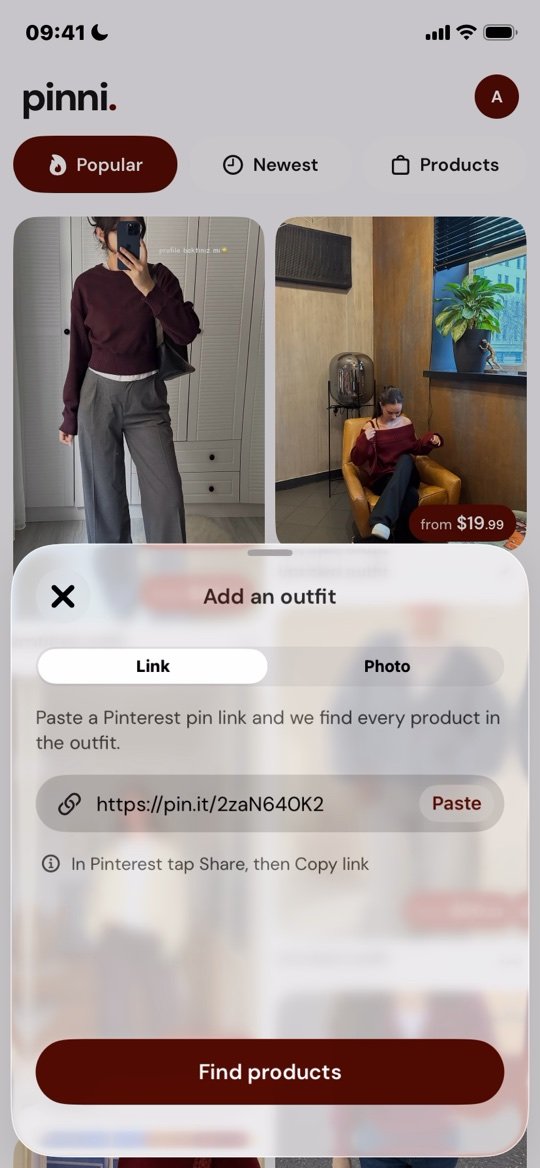
Matches are close, not always exact, so check the seller's page before you buy. pinni is an independent iPhone app and is not connected to Instagram or Pinterest. Get the app.
If the outfit is in a Reel, pause on the clearest frame, where the person is standing still and facing the camera. Motion blur is the most common reason a search misses.
Step 5: crop one piece and search it
If you prefer a free route, crop the screenshot to one piece and search it with Google Lens or another visual search. A search for the whole picture tends to return pictures of people, not clothes, so search each piece alone. A walkthrough of the process is in how to find clothes from a screenshot on iPhone.
If you need a method for turning a photo into good search words, find this outfit when there is no link goes through it with examples.
Save outfits you want to shop later
Instagram's save button works, but it keeps your saved posts in one long list that is hard to search. Many people save outfit posts to a Pinterest board instead, sorted by season or occasion. That makes it easier to see which pieces keep coming up. Later, you can shop the pin. Here is how buying from a pin works, and how to organize the boards.
Buying from an Instagram shop or ad
Instagram ads and small shops can be good places to find clothes, and also the place where many fake stores appear. Before you buy:
- Check that the shop has a real address and a contact email.
- Read reviews outside Instagram, not only the ones on the shop's page.
- Search the shop name with the word "scam" or "reviews".
- Be careful if the photos look copied from a big brand at a very low price.
- Use a card or payment service with dispute protection.
If you still find nothing
Message the creator politely, with a short question about one piece. Some reply, especially smaller accounts. Otherwise, take the closest match you can find. The shape, color and fabric are what carry the look. If budget is the issue, recreating an outfit on a budget covers where to spend and where to save. The same routine for video is in find clothes from TikTok.
Questions people ask
How do I find clothes from an Instagram post?
Check the shopping tags, caption, comments and the link in the creator's profile. If none list the item, screenshot the outfit and upload it to pinni, or search each piece with Google Lens.
How can I tell if an Instagram post has shoppable items?
Look for a shopping bag icon on the post. Tap the photo and the tagged products appear with names and prices.
Can I find clothes from an Instagram Reel?
Yes. Pause on a clear frame and take a screenshot, then search it or upload it to pinni. Also read the caption and comments, where creators often name the pieces.
Should I message the creator?
It is worth a try if the answer is not in the post. Keep it short, ask about one item, and do not expect a reply from large accounts.
How do I avoid fake Instagram stores?
Check for a real address, outside reviews and clear return terms, and be wary of prices far below the usual price for the item.
Screenshot it. Shop it.
Upload a screenshot of the Instagram outfit. pinni finds each piece and links you to a seller, with a price for every one.
Get the app