
Check the video for a shopping link under it, then read the comments and the creator's profile. If nothing names the clothes, pause on a clear frame, take a screenshot and upload it to pinni, which finds each piece and lists a price and a seller link. You can also crop one piece and search it with Google Lens.
Somebody in a 12 second video is wearing the best trousers you have ever seen, and the video is gone from your feed before you can blink. TikTok moves fast, which makes it a hard place to identify clothes. It also has an advantage that photos do not: the comments, where the crowd has usually already asked the question.
Step 1: save the video before you lose it
Keep the video first. Tap the bookmark or "Add to Favorites" button so it stays in your saved list. Videos can disappear from your feed, and recommended videos rarely come back. If you want a way to keep outfit videos for later, a Pinterest board is easier to sort than a long list of favorites.
Step 2: look for a product link under the video
When a creator is selling or recommending an item, a shopping link or basket often appears under the video. Tap it to see the item, the price and the seller. The creator may also have a link in their profile that leads to a page of everything they wear.
Step 3: read the comments before anything else
This is the fastest step. Open the comments and look for questions like "where is this from?" Creators often reply, or pin a comment with the answer. If you see a reply that names a brand, search the brand plus the item. Sort comments by top if the app offers it, because the most useful answers collect likes.
Scroll the comments for the item name, such as "jeans", "bag" or "link". Other viewers often post the answer and tag the shop.
Step 4: capture a clean frame and upload it
- Pause the video where the person is standing still and facing the camera.
- Take a screenshot.
- Open pinni, tap the plus button, choose the Photo tab and pick the screenshot. pinni spots each piece and lists a close match with a price and a link to the seller.
- Or crop to one piece and run it through Google Lens or Bing Visual Search for a free search.
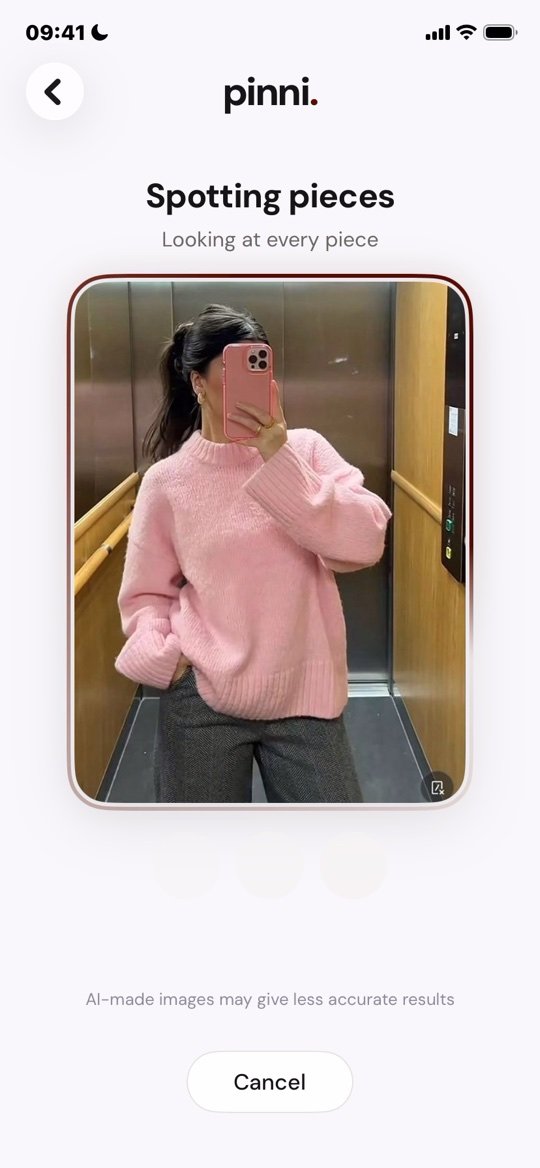
Matches are close, not always exact, so check the seller's page before you buy. pinni is an independent iPhone app and it takes no commission on what you buy. Get the app.
Video adds problems that photos do not have. Filters change colors, lighting is often warm, and the camera crops tightly. Treat the color you see as a guess and check it against the product photos. For the full method, see how to find clothes from a picture.
Step 5: search the way TikTok talks
People on TikTok often name an outfit by its style rather than by the product. Searching a phrase such as "old money outfit", "mob wife jacket" or "clean girl look" gives you videos that list the pieces. Then pick out the item you want and search it by color, fabric and cut. A guide to building these searches is in what to search on Pinterest for outfits, and the same words work in other apps.
Be careful with trending items
Trends sell out and then fill the internet with copies. If an item suddenly appears everywhere, expect two things: low quality versions at very low prices, and sellers who use the trend to catch buyers. Check the fabric, the reviews and the return policy before you buy. Unusually cheap listings that use stolen video or photos are a warning sign.
Finding a dupe
Many TikTok clothing videos are dupe videos, which show a cheaper version of a pricey item. They are a good starting point, but check the claim for yourself. Compare the fabric, the cut and the customer photos, as covered in how to find affordable dupes. The same routine for photos is in find clothes from Instagram.
Questions people ask
How do I find clothes from a TikTok video?
Check for a product link, read the comments, look at the creator's profile, and screenshot a clear frame to upload to pinni or search with Google Lens.
Why can I not find the outfit?
Filters, motion blur and tight framing make video harder to match than a photo. Try a different frame, or search the item in words.
Can I search for a TikTok outfit without the video?
Yes. If you remember the style, search the style name with the word "outfit" and look at the items listed in those videos.
Are clothes in TikTok ads safe to buy?
Some are, and some are not. Check the shop for reviews outside the app, a real address and a clear return policy before you pay.
What should I do if the video is gone?
Check your favorites and watch history. If you cannot find it, search for a phrase you remember with the word "TikTok", or ask in a clothing identification community.
Pause. Screenshot. Shop.
Grab a clear frame from the video and upload it. pinni finds each piece and shows a price with a link to the seller.
Get the app