
For clothes, Google Lens is the best free place to start, because it can crop to one item and shows shopping results. Bing Visual Search and TinEye are useful backups. Reverse image search finds where a photo appears, and visual search finds things that look like it, so use the first to trace a photo and the second to shop it. For a full outfit, an app such as pinni lists every piece at once.
Reverse image search was built to answer one question: where else does this picture exist? That is a great tool for finding the original post. For finding a pair of trousers, it is not quite the right tool, and most people are never told why their search returned twelve copies of the same photo and no clothes at all.
Two tools that look like one
| Reverse image search | Visual search | |
|---|---|---|
| Question it answers | Where else is this exact photo? | What looks like this? |
| Good for | Finding the source, the creator, the date | Finding products that look similar |
| Examples | TinEye, Google Images | Google Lens, Bing Visual Search |
| Best for clothes when | You need the original post and its credits | You want something to buy |
Most tools now do both, but they give you different results depending on which part you use. If you only want to buy the thing, go straight to visual search. If you want to know who made the outfit, trace the photo first.
Google Lens
Google Lens is available in the Google app, in Chrome and in Google Photos. Open an image, tap the Lens icon, and drag the selection box over the item you want. The results include a Products view with prices from different sellers. It works best on a clear, straight on photo of a single item.
Bing Visual Search
Bing Visual Search lets you crop to a region of the image, and returns related images and shopping results. It sometimes surfaces different sellers than Google does, so it is worth a try when Lens comes up empty.
TinEye
TinEye is a reverse image search that sorts results by how old they are, so you can see the earliest known appearance of a photo. That is useful for finding the original source, which often has the credits. It does not shop for you.
How to get better results
- Crop to one item. Searching a full outfit confuses the tool.
- Use the sharpest version of the photo. Screenshots of screenshots lose detail.
- Avoid photos with heavy filters, text overlays or stickers across the clothes.
- Try a second photo of the same outfit, from another angle.
- Add words to the search. Lens lets you add text such as "black leather" to narrow the results.
Shoes, bags and jackets are more distinctive than plain tops and trousers. Start with those and the rest is easier to guess.
Where it falls short
Image search matches shapes and colors, not brands. It can return a lookalike that is not the same item, and it often fails on plain pieces, because a black tee matches thousands of other black tees. It also struggles when clothes are partly hidden, folded or worn under other layers. When you hit that wall, switch to words. A step by step method is in find this outfit when there is no link.
When an app does it better
General image search is built for everything, from landmarks to plants. A tool made for shopping reads an outfit as a set of pieces. pinni takes a screenshot or a photo from your library, or a Pinterest pin link, spots each piece, and lists a close match for every one with a price and a link to the seller. That replaces five crops and five results pages with one list.
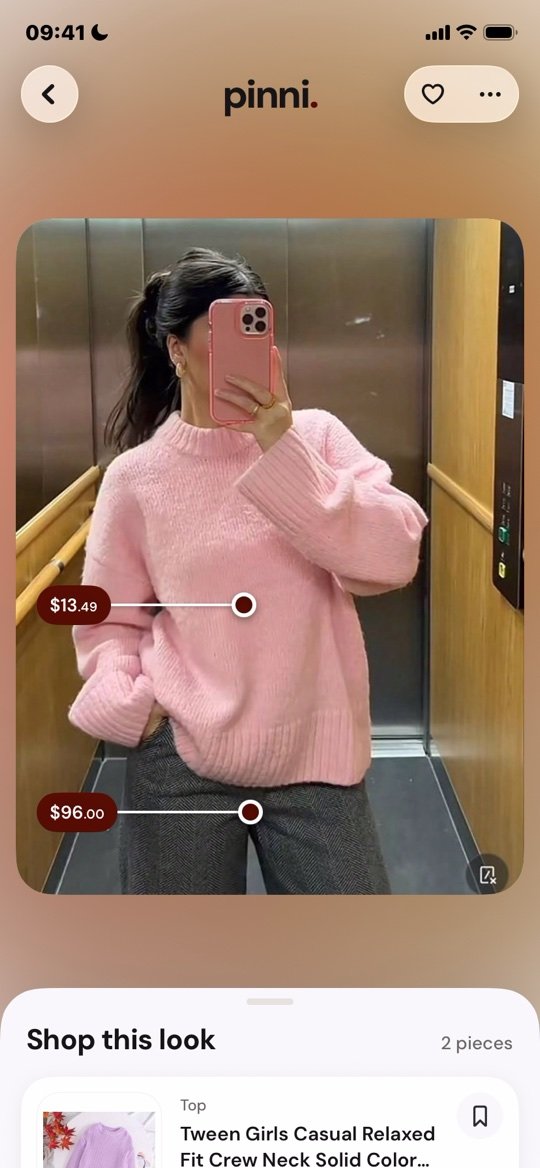
pinni is an independent iPhone app and it takes no commission when you buy. Get the app. To judge any app before you download it, use outfit finder apps: what to look for.
Tracing the source of a photo
If you want the original post, use a reverse image search and sort by oldest. Open the earliest result and read the caption, the credits and the comments. Creators often name their clothes there. This works well for photos from blogs, magazines and Pinterest, and less well for photos shared in private messages.
On a phone
On an iPhone, the easiest route is to save the photo and open it in the Google app, or to long press an image in Chrome and choose the Lens option. The full walkthrough is in how to find clothes from a screenshot on iPhone, and the whole method in how to find clothes from a picture.
Questions people ask
Can you reverse image search clothes?
Yes. Crop the item and use Google Lens or Bing Visual Search. Expect close matches rather than the exact item every time.
What is the best reverse image search for clothes?
Google Lens is the usual first choice because it shows shopping results. Bing Visual Search and TinEye are good backups. For a whole outfit, an app such as pinni lists each piece with a price.
What is the difference between reverse image search and Google Lens?
Reverse image search looks for copies of the same photo. Google Lens looks at what is in the photo and finds similar things, including products.
Why does image search give me the wrong clothes?
Plain items match many products, and filters, folds and angles confuse the tool. Crop tighter, use a clearer photo, or search in words.
Is reverse image search free?
The main tools are free to use. pinni has a small allowance of new outfits.
Shop the whole outfit from one pin or one screenshot.
Paste a Pinterest pin link or upload a screenshot. pinni finds each piece, shows a price and links you to the seller. Made for iPhone.
Get the app