
There is no single clothing search engine that wins for every photo. Google Lens is the best free default for one piece, Bing Visual Search is a good second opinion, Pinterest camera search finds more outfit ideas, store apps search only their own stock, and pinni reads a whole outfit from a screenshot or a pin link. Pick by what you are searching for.
You have a picture and you want the product. The tools that claim to do this work in very different ways, and picking the wrong one is why people say "image search never works for clothes". Here are five, compared on what each one is actually good at.
The five tools at a glance
| Tool | Best for | Weak spot |
|---|---|---|
| Google Lens | One piece, with shopping results | Returns lookalikes for plain items |
| Bing Visual Search | A second opinion, with a crop tool | Fewer shopping sellers in some regions |
| Pinterest camera search | More outfits like this one | Returns pins, not product pages |
| A store's own photo search | Buying right away | Only that store's stock |
| pinni | A whole outfit from a screenshot or pin | Close matches, not always exact |
1. Google Lens
Google Lens is built into the Google app, Chrome and Google Photos. Open an image, drag the box over one item, and open the Products view. It is free, fast and works best on a clear photo of a single piece.
2. Bing Visual Search
Bing Visual Search lets you crop a region and returns related images and shopping results. It sometimes shows different sellers from Google, so it is useful when Lens comes up empty.
3. Pinterest camera search
The Pinterest app has a camera icon in its search bar that searches with a photo. The results are pins, so you get more outfits like yours. That is great for ideas, and less direct for buying.
4. A store's own photo search
Some retailers have photo search inside their apps. You upload a picture and see similar items from that store. Everything shown is for sale, but you see only one shop's stock.
5. pinni: a whole outfit at once
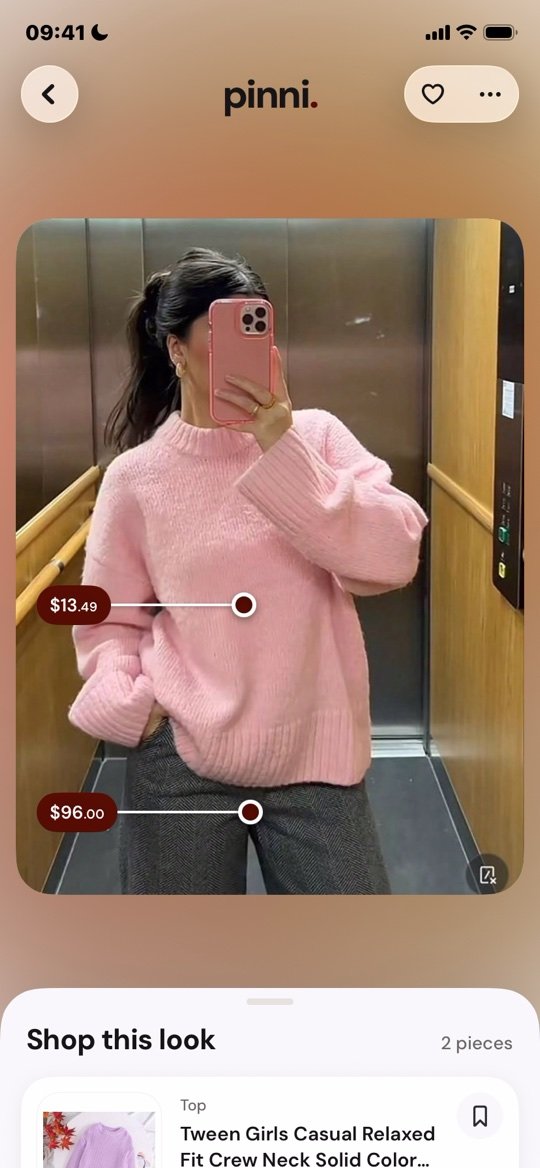
The first four tools work one piece at a time. pinni takes the whole outfit. Paste a Pinterest pin link, or upload a screenshot or any photo from your library, and it spots each piece and lists a close match for each with a price and a link to the seller.
pinni is an independent iPhone app and it takes no commission when you buy. It is for clothes, shoes and bags, not for every kind of object. Get the app.
How to choose
- One piece, free: Google Lens, then Bing.
- Inspiration, not a purchase: Pinterest camera search.
- A full outfit with several pieces: an app that reads the whole picture.
- You already know the store: that store's app.
Tips that help every tool
- Crop out captions, usernames and buttons first.
- Use the sharpest copy of the photo, not a screenshot of a screenshot.
- Search the shoes and the bag first. Their shapes are distinct.
- Add a word or two, such as "wool" or "black leather", when the tool allows text.
The full walkthrough is in how to find clothes from a picture, the difference between tracing a photo and shopping it is in reverse image search for clothes, and the checks for an app are in outfit finder apps: what to look for. How the AI part works is covered in AI outfit finder by photo.
Questions people ask
What is the best clothing search engine by image?
Google Lens is the usual first choice for one piece. For a whole outfit, use an app such as pinni that reads the full picture.
Can I search for clothes with a photo?
Yes. Upload the photo to Google Lens, Bing Visual Search or a shopping app, and open the shopping results.
Is there a fashion search engine for outfits?
Pinterest is the best known for finding outfit ideas. For turning an outfit photo into products, use a visual search or an outfit finder.
Are image search tools free?
Google Lens and Bing Visual Search are free. pinni has a small allowance of new outfits.
Why does image search return the wrong clothes?
Plain items match many products, and blurry photos, filters and tight crops confuse the tool. Crop tighter and use a sharper photo.
Search the whole outfit at once.
Upload a screenshot or paste a pin link. pinni finds every piece, with a price and a link to each seller.
Get the app